






Soapsuds
Member
-
Joined
Everything posted by Soapsuds
-
 Jump!!!!
 -
Who invited Elmer Fudd? Sheila debuted 30 years ago but they make it seem like she's been on the soap the whole time. Publicity stunt!😂
-
https://www.soapoperadigest.com/content/carolyns-opinion-1719441/?fbclid=IwAR0A8wPM6AvipUvOVLHHuN2lK7zRcGF1XxXAL_cCnvJ45qLs93fsEFo-T30
-
Let's hope she jumps! The character has been shoved down our throats a la BB Liam. She should've never been brought back. They write the same sh!t for her. It is repeated so many times that I've lost count.
-
-
He was on Beyond Salem 2. He played Andrew Donovan. The son of Shane Donovan and Kimberly Brady.
 Ron's Days is either a mess with ridiculous stories or it's boring. That's why I haven't tuned in. The show is stale. The fall promo was well done but unfortunately it overhyped pretty much nothing.
It's a shame Zach Tinker can't cross over to BB as Fen to be involved in the story.
Week ending March 25 1984
Ron's Days is either a mess with ridiculous stories or it's boring. That's why I haven't tuned in. The show is stale. The fall promo was well done but unfortunately it overhyped pretty much nothing.
It's a shame Zach Tinker can't cross over to BB as Fen to be involved in the story.
Week ending March 25 1984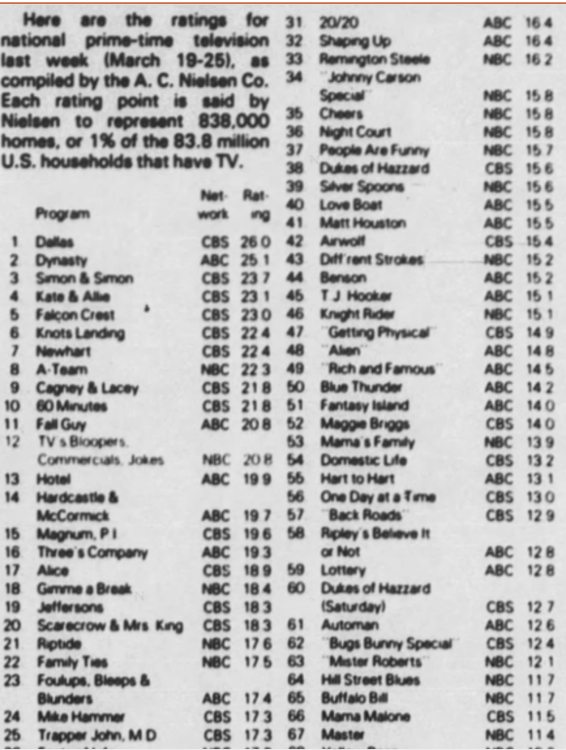 The silence is telling! I'm four days behind and I'm not rushing to my tv to watch.
Any news on Days ratings? Someone mentioned Peacock shows would be in the Nielsen numbers.
That too!😎
Can't wait!! At the stores or even hospital shops have them. Not everyone puts them out on Monday or Tuesday. I've seen some places put them out for sale the week before.
The wild cards given in Paris indoors is just ridiculous!
The silence is telling! I'm four days behind and I'm not rushing to my tv to watch.
Any news on Days ratings? Someone mentioned Peacock shows would be in the Nielsen numbers.
That too!😎
Can't wait!! At the stores or even hospital shops have them. Not everyone puts them out on Monday or Tuesday. I've seen some places put them out for sale the week before.
The wild cards given in Paris indoors is just ridiculous! SC is mainly twinks with the likes of Jeremy Skott Snider back in the day. Men has a mixture of both twins and older men. I guess if he could moan he'd do alright.😂
NBC News Daily dropping again. It's in last place in ever category. Nice to see TPIR up in numbers.
Shudders the thought of him having other projects. He's a terrible actor.
You're obviously not a latino.😂
SC is mainly twinks with the likes of Jeremy Skott Snider back in the day. Men has a mixture of both twins and older men. I guess if he could moan he'd do alright.😂
NBC News Daily dropping again. It's in last place in ever category. Nice to see TPIR up in numbers.
Shudders the thought of him having other projects. He's a terrible actor.
You're obviously not a latino.😂

Important Information
By using this site, you agree to our Terms of Use and Privacy Policy

Account
Navigation
Search
Configure browser push notifications
Chrome (Android)
- Tap the lock icon next to the address bar.
- Tap Permissions → Notifications.
- Adjust your preference.
Chrome (Desktop)
- Click the padlock icon in the address bar.
- Select Site settings.
- Find Notifications and adjust your preference.
Safari (iOS 16.4+)
- Ensure the site is installed via Add to Home Screen.
- Open Settings App → Notifications.
- Find your app name and adjust your preference.
Safari (macOS)
- Go to Safari → Preferences.
- Click the Websites tab.
- Select Notifications in the sidebar.
- Find this website and adjust your preference.
Edge (Android)
- Tap the lock icon next to the address bar.
- Tap Permissions.
- Find Notifications and adjust your preference.
Edge (Desktop)
- Click the padlock icon in the address bar.
- Click Permissions for this site.
- Find Notifications and adjust your preference.
Firefox (Android)
- Go to Settings → Site permissions.
- Tap Notifications.
- Find this site in the list and adjust your preference.
Firefox (Desktop)
- Open Firefox Settings.
- Search for Notifications.
- Find this site in the list and adjust your preference.