




Forever8
Member
-
Joined
-
Last visited
Everything posted by Forever8
-
Tonya Pinkins (ex Heather - ATWT and ex Livia - AMC) guest starred on last night's God Friended Me.
-
Aubrey Dollar (ex Marina Cooper, GL) will be Co-starring on Filthy Rich on Fox with Kim Cattrall sometime this mid-season.
-
Christine Lakin (Al, Step By Step) and Alaa Khaled ( DJ Khaled's brother) Co-host a podcast called Worst Ever Podcast. Where they have interviewed several former child stars including Staci Keanan, Nicholle Tom, and several members of The Mickey Mouse Club that aired on Disney Channel.
-
I wish I was able to experience Natalie in her prime too. I've been watching AMC from 1987. It is the aftermath of her rape trial. She still has strength but is more vulnerable. I love the ending of an episode of her simply contemplating putting up the Christmas reef. It is something alluring about her and I love the extended theme playing over the credits. It got me to thinking Janet must've been a blessing and a curse for Kate Collins. I wonder what is Kate up to now?
-
Gary and Valene Ewing : Their second chance at love is beginning to unravel. By Gary's quest for success and by introducing us to Judy and Earl Trent. I don't understand why he would have an affair with Dull as Dishwasher Judy (No offense Jane Elliot) Not to mention her equally dull husband Earl. Who pops back up as Val's substitute professor who ultimately wants to sleep with her as revenge for his wife's affair with Gary. I do like Val's interest in pursuing higher education and her budding talent in creative writing. My favorite cameo had to be Bobby in the episode about Val's colon cancer. He made an impact without taking over an episode. You can automatically tell things won't be as good as they were when they moved to California. Sid and Karen Fairgate : For a man being charged with attempted rape. Sid was more laid-back in the two-part season premiere. Although at times Karen can come off as shrill. I think it was warranted in this case when it came to firing Richard as his lawyer. I did like she and Abby teaming up to get that license plate to clear Sid. Then let's not forget when they had Sid's female mechanic employee Linda come onto him. Why writers have all if not most of the husbands cheat on their wives? (Kale Browne made a cameo as Sid and Abby's nephew) I'm assuming Michael's hyperactive condition isn't going to be mentioned again. Richard and Laura Avery : Richard is such a butthole. This man is basically flaunting his affair with Abby in front of everyone at a party held for his wife. I was like all of this time you're rubbing sunscreen on Abby. You can be looking for another job. Laura remains one of my favorite characters on this show. We see her gain her independence by becoming a successful realtor. Becoming the only person working in the Avery household for a time. I like her admitting to her boss that she is attracted to him. But knows Richard needs her and that can be contributed to her taking care of her father when her mother died when she was younger. I kind of wish it was more said between Abby and Laura about the fling. Instead of that quick exchange at the siege at Ginger's baby shower. (Bonus: I did like Karen calling Richard an "Ass" at the party.) Now I'm starting Season 3!!!
-
I'm officially through with watching Season 2 of Knots Landing. And I must say I honestly enjoyed Season 1 more as a whole. It felt like the writers wanted to capitalize off the sky rocket popularity of Dallas at the time. By not only insisting of cameos with varying degrees of success. (More on those later) In addition, it seemed like they wanted this season to be serialized instead of episodic like its first season. Nonetheless, to me it felt like they gave up in the middle of the season. Going back to giving certain characters A&B stories. Instead of giving all of the couples and Abby plots of their own. Abby Cunningham - I didn't expect her to appear in the two-part season premiere. I thought she would show up after Sid was proven innocent of the "attempted rape." I was surprised at how well she got along with Valene early on. So knowing what eventually happens makes it even more complicated. But I'm like girl, Why go after Richard of all the men in LA? I think she easily gathered he was a weak man whose ego she could easily stroke. Perhaps it had to with finally being the one in command of a relationship. Since we learn Jeff was the head of the household when they were married. Then she became drawn to Gary when she got a part-time job at Knots Landing Motors as a bookkeeper. I think it had to do with him wanting power and also her finding out he came from wealth. Though I appreciate how multifaceted she is when it came to her children. That scene of her breaking down when she gets the tape of Jeff informing her he did take Olivia and Brian. Made me realize she is just more than a blonde bombshell vixen. Tonya Crowe was such a precocious child actress who didn't come off as annoyingly cutesy. Kenny & Ginger Ward : I was also surprised at how long Ginger let Kenny move back in. It's obvious TPTB didn't really have much interest in these two. Frankly, I still prefer Ginger more than Kenny. Although James Houghton charisma gives the character a personality. They still feel underdeveloped as characters. The double standard of Kenny not only sleeping with Sylvie (his mistress) and Kristin (Why was she was on this show?) But him getting upset over Ginger seeing her with her potential love interest Carl (the pediatrician made me shake my head. What I don't get is why we didn't get any scenes with her and her mother in The Man Of The Hour? I wonder did they film any and were cut for time? Last season it was hinted her mother and she had a contentious relationship. What if we saw her mom blaming her for letting her sister to go the party? Or Ginger telling her she still is upset about the abortion she made her had and isn't going to be overprotective with her children like she is? Next I will be discussing the ups and downs of the Fairgate unit. And how even Jane Elliot couldn't save that ridiculous Gary/Judy affair. And Laura Avery gained independence in spite of her jealous husband.
-
Almost done with Season 2. Will post my thoughts on it soon.
-
Robert Newman (Josh, GL) was a recent guest on the Soap Opera Digest Podcast. He talked about his work on stage and screen. And of course memories of Guiding Light.
-
-
Season 1 Finally, after years of reading and re-reading this forum in particular. I was able to locate episodes of Knots Landing. We all know it is a struggle to find since this show isn't streaming nor made enough impact to have the rest of the series released on DVD. The season as a whole is more episodic than serialized. So I will break down my thoughts more on the four couples below. Sid & Karen Fairgate : If I didn't know this show was a Dallas spin-off. I would think the show is primarily about them. It felt like at times it was Fairgate Landing 😂. Karen, initially came off as shrill to me. It seem the writers didn't know who she was as a character early on. However, when they focused on her being a loving housewife and mother there for her community something started to click. Michele Lee must have been given better direction in subtlety overtime. At times we saw her as someone who was tied down too young wanting to explore herself as being more than suburban housewife. I do like Sid though. He seemed more content with his life. Perhaps since he was older and accomplished what he wanted. You needed someone who is the Everyman. Don Murray and Michele Lee did have chemistry. And I liked Diana, Eric, and Michael. It was refreshing to see them come of age realistically . The Fairgate's came off for the most part a typical middle class suburban family. I know their dynamic is going to change next season for sure. PS: Who knew Karen would get one over on JR Ewing? She and Larry Hagman had a spark too. Gary & Valene "Val" Ewing : It felt for the most part they were given mostly B Plots. In a show that was tailored for them. It was good seeing Gary finding another way to be a successful businessman at Knots Landing Motors with Sid. Meanwhile, Val's attire seemed to display she was stuck in arrested development. Especially, those ribbon bows that Karen might of borrowed in the finale. It was clearly obviously Lucy/Charlene Tilton was not going to fit in this edition of the series. She was too mature for Diana/Eric. And she probably would've fit in with Ginger and Kenny only so much. Maybe, in a few years when the show became full on primetime soap she could've fit in more. I liked Val getting her GED and Gary falling off the wagon. Gary and Val's second chance at marriage is not going to last. Since I already know what lies ahead. Richard & Laura Avery : Constance McCashin was so underrated on Knots Landing as an actress. At first, Laura was just a housewife with a lawyer for a husband and mother to a little boy. Underneath it all she was a fallible woman with past indiscretions. I liked her friendship with Val. While, Karen was more of a friend you drink coffee and eat cheesecake with. Laura would give it to you straight without the BS. I liked how her father encouraged her to step up to Richard by giving him the check with strings attached. Richard, is so smarmy, but I did enjoy him as the upward mobile professional with big dreams on the low end of the totem pole. Only he would host a BBQ to hit up his neighbors for money. PS: John Pleshette wrote the second part of the finale. Kenny & Ginger Ward : Honestly, I cared more about Ginger than Kenny. To me, Ginger was somewhat better defined as a character than her husband. We know she was a twenty-something who was ready to settle down. That possibly have a controlling mother who was forced into having an abortion as a teen. In this season Kenny's background didn't get any focus. So we just know he is a record producer who loved his job way too much and can't stay faithful. Thank God, Ginger put her foot down. Telling Kenny to go. I doubt it is going to last long into Season 2. But at least she didn't take him back so easily. My favorite episodes of Season One are 1:04 The Lie, 1: 09 The Constant Companion and 1:11 Courageous Convictions. My least favorite episode is 1:07 the episode with that damn motorcycle gang attacking the cul-de-sac and the beach. It felt like the part of an episode of any series of Power Rangers when the monsters attack the public, before the Rangers come to defeat them. Onto Season 2!!!
-
Currently watching Knots Landing for the first time ever - Season 1 Felicity - Restarting my Season 1 Binge from last year.
-
Is there anywhere I will be able to watch episodes online?
-
Watched the July 5th episode and I must say this show could've had the potential to rehab itself. Someone was needed to stir this show around with a cohesive vision. This show suffered too many changeovers in its run. I wonder how someone like Pamela Long would've done long-term in the 90's? I miss characters in soaps like Ava who aspired to have more than their humble upbringing and will do anything to get it. I loved her scene with Kate. I would like to see more of Stacey/Jack/Rick story play out. Hopefully, someone will uncover more episodes of that era soon. BTW Lauren-Marie Taylor is on Instagram.
-
Just got done watching with 7/14/95. This one not much happened. It is the aftermath of Nick and Matt getting into their big fight over Sharon. Deep down Hope knows she and Victor Jr. is in the way of Victor's life. She even accepted Cliff's offer to drive from Kansas to Genoa City to get her and the baby. At first Douglas came off as nosy by asking her if that was Victor on the phone? However, he did redeem himself by coming close to telling her about Victor dealing with Nick. Victor & Hope did seem to resolve their issues... for now. It's obvious Matt is going to do something sinister due to his anger. Amy defends both Nick and Sharon to him. Poor Olivia! She gets in her lingerie for Nathan 3.0. He is like I'm not in the mood. So she goes to confide her suspicion to the same male doctor from before. Then she goes to see Paul whom just had an encounter with Mary and Christine about take out food and her infamous sauerkraut and spare ribs. Liv wants Paul to investigate Nathan. But he knows Nathan is interested in another woman . He ends up telling her about it being a conflict of interest. Liv tells her she will get to the bottom of it, before leaving the office. We also get a cameo of Lil Nate's Nanny. Nikki comes over to the apartment to tell Sharon to stay away from Nick. Also blaming her for him getting hurt. Stating she shouldn't have gave off the persona of being virginal. Sharon admitted she should've told Nick about losing her virginity and having a baby. Before Nikki departs, Sharon tells her to tell Nick she is sorry.
-
Thanks for providing these episodes @YRfan23 Thoughts on the 6/26/95 episode From what I read and I suspect that these are Brenda Epperson last days as Ashley. She and EB had chemistry. It's odd to see Victor be vulnerable. It is also quite clear Hope and he want two different things out of life and neither were going to budge. I had to do a double take when Victor told Ash he was learning not to be a controlling father. 😂 90's Phyllis would slap the present day one and show her she doesn't need anyone to help her scheme. I didn't know Sasha came onto the canvas this early. Only on television when someone would confide to their co-worker about their sex life. I take it this is gearing up the Nathan/Keesha storyline. And I agree with @DRW50about the teen quad make you care about the storyline. Now we don't have teens on YR because the 40 something's have their stories.
-
Charley Webb (Debbie, Emmerdale) is the younger sister of Jamie Lomas (Warren, Hollyoaks) and the ex sister-in-law of Kym Marsh (Michelle, Corrie) Camryn Grimes (Cassie/Mariah) is the niece of Scott Grimes.
-
Another British One : Jake Roche (Ex Isaac Nutall Emmerdale and lead singer of the band Rixton ) is the son of EastEnders star Shane Richie (Alfie Moon) and Loose Women Co-host and Nolan Sisters singer Coleen Nolan.
-
Lindsay Frost (Ex Betsy - ATWT) is the daughter of actor Warren Frost.
-
Amber Tamblyn : (Ex Emily Quartermaine GH) daughter of actor Russ Tamblyn Alyvia Alyn Lind : (Faith Newman YR) daughter of actress Barbara Alyn Lind best known for Deb on One Tree Hill.
-
From the Santa Barbara Blog Via Facebook The Santa Barbara Cruise
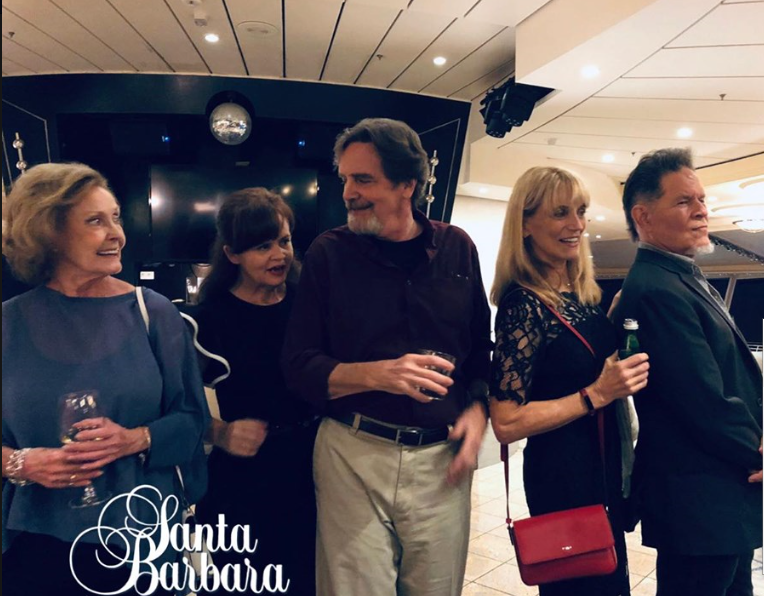
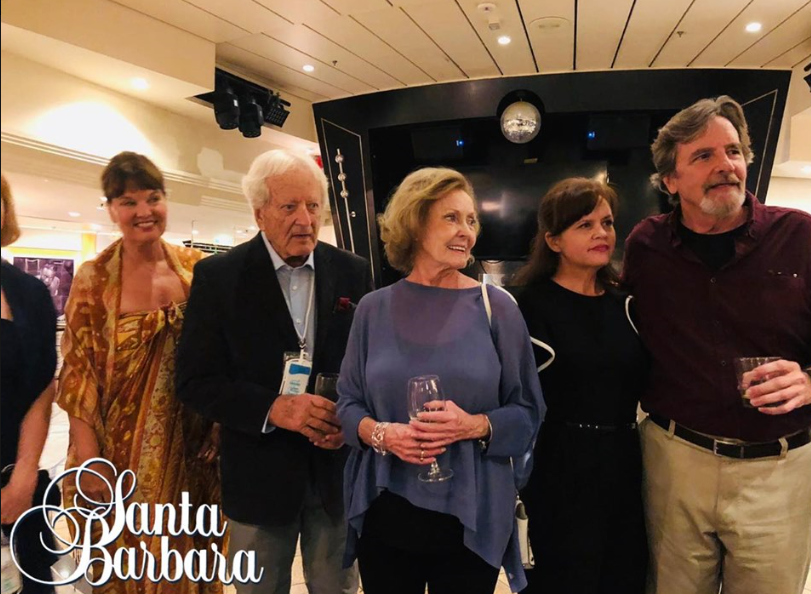 @DRW50 How would you fix the current state of the show if you could? I'm curious to read your thoughts.
Important Information
By using this site, you agree to our Terms of Use and Privacy Policy
