






Soapsuds
Member
-
Joined
Everything posted by Soapsuds
-
 Sunday night was must see tv on CBS. I loved the lineup!
 -
I'm already an episode behind. I haven't seen Tuesday episode yet. After reading spoilers for this week I'm in no rush to watch. I'm more interested in next weeks shows. I may or may not watch this week. I miss beyond Salem because those episodes I would watch at 6am.
-
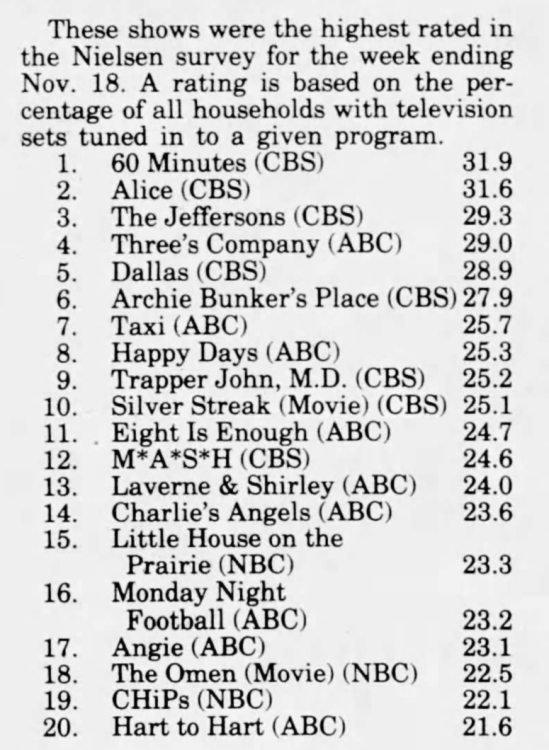
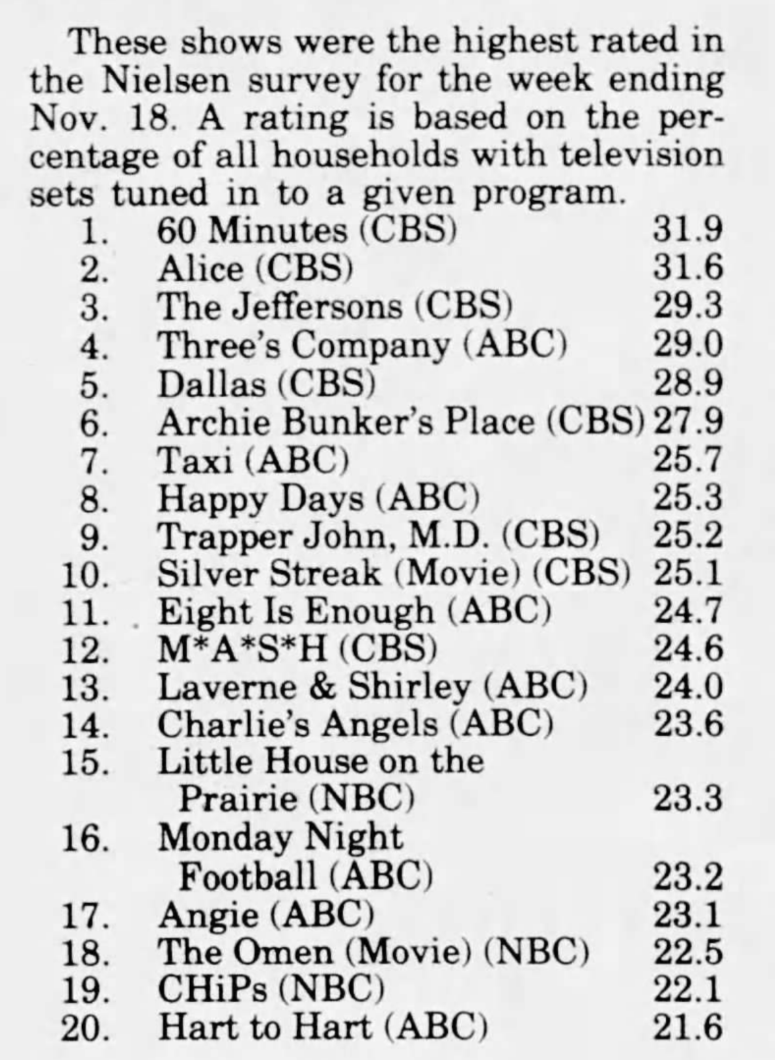
Week ending November 18, 1979
-
Jon is no Richard Gere. I'll pass on this reboot even though Rosie is in it.
I don't think there should be a specific time to post about the day episode. We are not going to see it at the same time anymore due to it being on peacock. I think we all have common sense to know the current episode could be discussed at any time when entering this thread.
Hot damn to both!!😍😍
Hey now don't forget Joass You're welcome! Glad to hear!😊
 https://support.roku.com/article/208755468
Murray Bartlett just won an Emmy for The White Lotus.
I noticed as well on the days icon on peacock it gives the time when a new episode will be uploaded. They didn't have that before not even with Beyond Salem.
I thought Stephanie scenes with Abe and Paulina were nicely done. The actress blends well with the rest of the cast.
She's the best recast they've had in a long time. I really like her a lot. She could've been a Ciara recast since Days is hell bent on pairing Stephanie with Ben 2.0.
I also got the welcome too. I just got a call from my cousin asking how to get Days. His mother watches the show and knew of the move but didn't know where to go to sign up. NBC did a terrible job transferring Days to Peacock. Just awful. I have a feeling a lot of people are lost now that Days is no longer on the air.
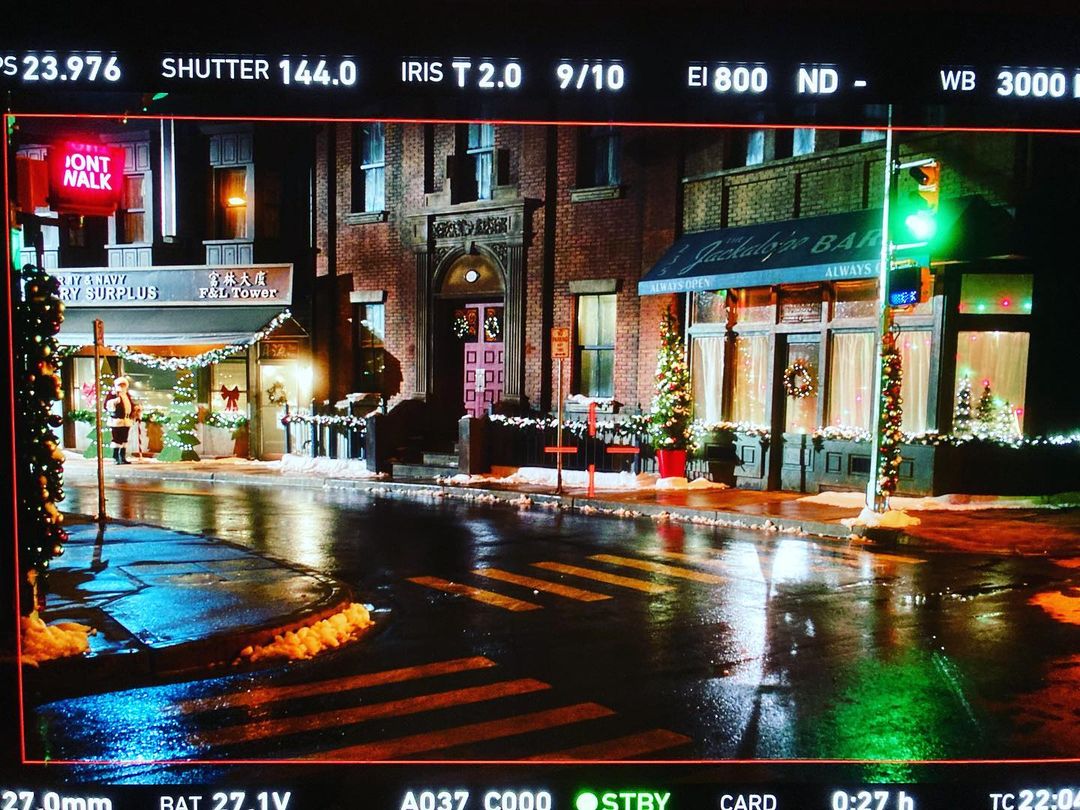
Love this shot from our latest Christmas movie with a crazy high concept hook (kinda multi-verse), that’s Santa on the far left. Just needs some sound effects of dogs barking, couples arguing in their apartments, a lonely police siren… lighting brought to you by ultra talented DOP Andy Hodgson
https://support.roku.com/article/208755468
Murray Bartlett just won an Emmy for The White Lotus.
I noticed as well on the days icon on peacock it gives the time when a new episode will be uploaded. They didn't have that before not even with Beyond Salem.
I thought Stephanie scenes with Abe and Paulina were nicely done. The actress blends well with the rest of the cast.
She's the best recast they've had in a long time. I really like her a lot. She could've been a Ciara recast since Days is hell bent on pairing Stephanie with Ben 2.0.
I also got the welcome too. I just got a call from my cousin asking how to get Days. His mother watches the show and knew of the move but didn't know where to go to sign up. NBC did a terrible job transferring Days to Peacock. Just awful. I have a feeling a lot of people are lost now that Days is no longer on the air.
Love this shot from our latest Christmas movie with a crazy high concept hook (kinda multi-verse), that’s Santa on the far left. Just needs some sound effects of dogs barking, couples arguing in their apartments, a lonely police siren… lighting brought to you by ultra talented DOP Andy Hodgson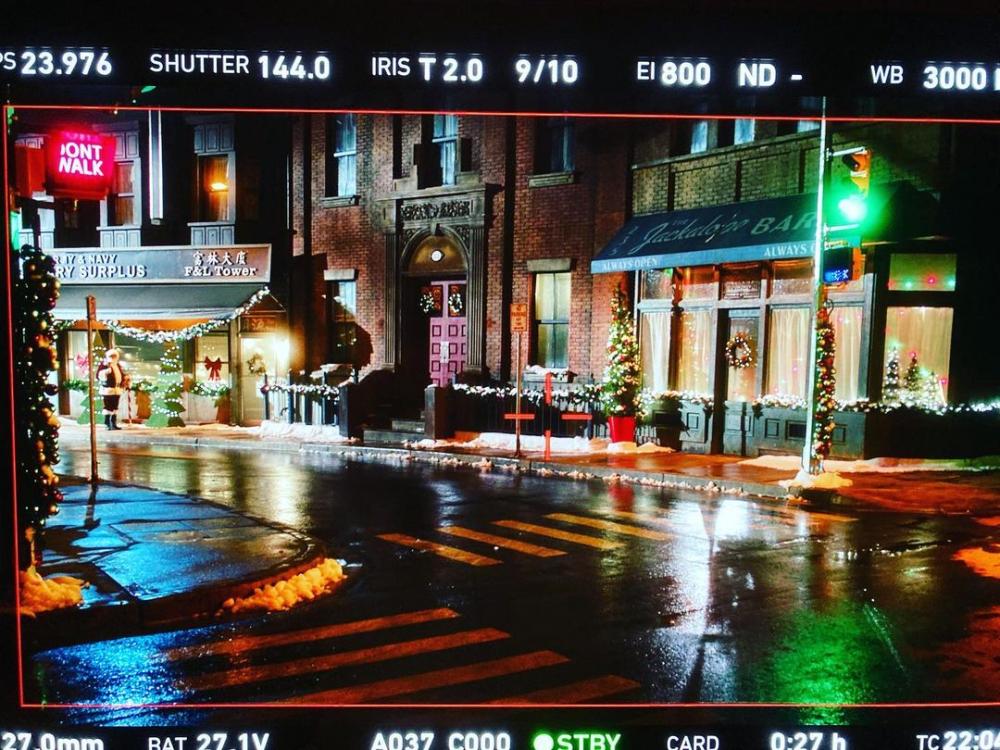 😂😂😂😂
Just watched... Ben 2.0 is just a waste of time. The actor who plays Li can't act. He is horrible. Carson Boatman is one hot hunk but he can't act. He should be doing gay porn. Yes I said it! Brandon Barash is better playing Stefan than Jake. Stephanie is a breath of fresh air. I really like her and the actress.
I didn't even know she has a talk show. Every dick and harry has a talk show now. They are just giving them away. Jennifer's show here is on CBS right after the talk at 2pm.
What are you eating?😂
More spoilers for that week: Sonny remembers something crucial about his attack. Leo begs Gwen for help. Nancy receives a marriage proposal Rafe is shocked by what Gabi tells him
😂😂😂😂
Just watched... Ben 2.0 is just a waste of time. The actor who plays Li can't act. He is horrible. Carson Boatman is one hot hunk but he can't act. He should be doing gay porn. Yes I said it! Brandon Barash is better playing Stefan than Jake. Stephanie is a breath of fresh air. I really like her and the actress.
I didn't even know she has a talk show. Every dick and harry has a talk show now. They are just giving them away. Jennifer's show here is on CBS right after the talk at 2pm.
What are you eating?😂
More spoilers for that week: Sonny remembers something crucial about his attack. Leo begs Gwen for help. Nancy receives a marriage proposal Rafe is shocked by what Gabi tells him
Important Information
By using this site, you agree to our Terms of Use and Privacy Policy

Account
Navigation
Search
Configure browser push notifications
Chrome (Android)
- Tap the lock icon next to the address bar.
- Tap Permissions → Notifications.
- Adjust your preference.
Chrome (Desktop)
- Click the padlock icon in the address bar.
- Select Site settings.
- Find Notifications and adjust your preference.
Safari (iOS 16.4+)
- Ensure the site is installed via Add to Home Screen.
- Open Settings App → Notifications.
- Find your app name and adjust your preference.
Safari (macOS)
- Go to Safari → Preferences.
- Click the Websites tab.
- Select Notifications in the sidebar.
- Find this website and adjust your preference.
Edge (Android)
- Tap the lock icon next to the address bar.
- Tap Permissions.
- Find Notifications and adjust your preference.
Edge (Desktop)
- Click the padlock icon in the address bar.
- Click Permissions for this site.
- Find Notifications and adjust your preference.
Firefox (Android)
- Go to Settings → Site permissions.
- Tap Notifications.
- Find this site in the list and adjust your preference.
Firefox (Desktop)
- Open Firefox Settings.
- Search for Notifications.
- Find this site in the list and adjust your preference.