Soapsuds
Member
-
Joined
Everything posted by Soapsuds
-
Ick! Seeing MS and BF making out as the characters onscreen was just ewwww.
-
The SON board.😂
-
That was the best part of Tuesday's episode. Martin and Smitty and their family are boring.
-
Crew Morrow's acting on Tuesday's episode was just dreadful. The weird faces he was making were just awful
-
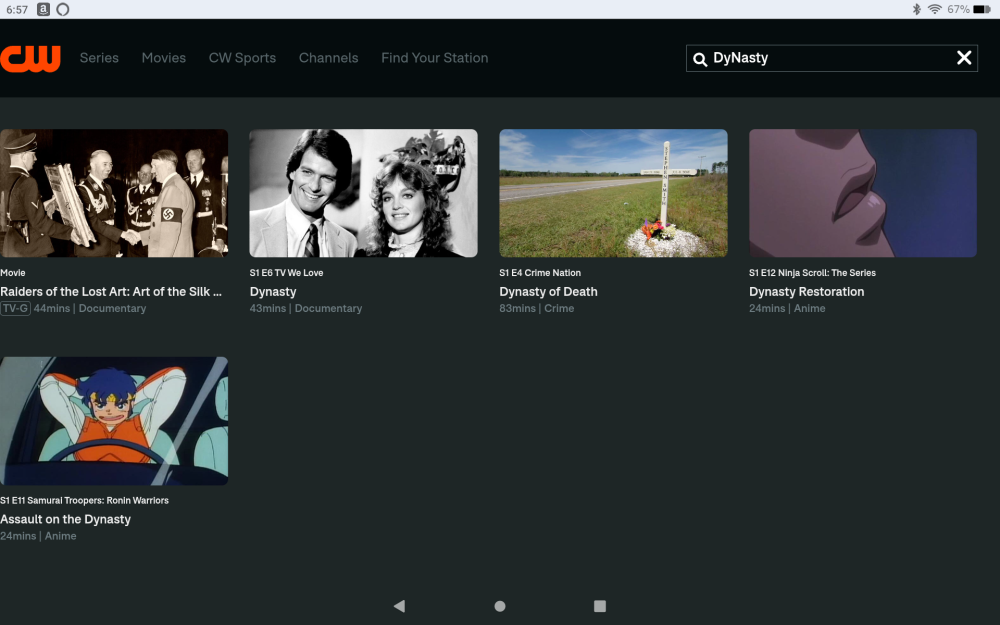
It won't allow me to watch it via the link; I am only able to watch it with the app.
-
The CW aired a documentary about the television series Dynasty last night. The documentary is available on the CW app. You will need to download the CW app to watch the documentary.
-
Frat Boy Jr.'s reaction to seeing Luna was just awful acting. It was so bad that I started laughing.😂 Does anyone have screenshots of it?Just some odds and ends about Dan Gauthier.

.jpeg.e9997cb3df39efeb4c930a4e1f37f9ac.jpeg)

.webp.84d1137c66be9098b0c9954d05ecc9b4.webp) Another classic episode. Can't wait!@AbcNbc247 Too easy.😂I'm sure someone else agrees.😂
Another classic episode. Can't wait!@AbcNbc247 Too easy.😂I'm sure someone else agrees.😂
Important Information
By using this site, you agree to our Terms of Use and Privacy Policy

Account
Navigation
Search
Configure browser push notifications
Chrome (Android)
- Tap the lock icon next to the address bar.
- Tap Permissions → Notifications.
- Adjust your preference.
Chrome (Desktop)
- Click the padlock icon in the address bar.
- Select Site settings.
- Find Notifications and adjust your preference.
Safari (iOS 16.4+)
- Ensure the site is installed via Add to Home Screen.
- Open Settings App → Notifications.
- Find your app name and adjust your preference.
Safari (macOS)
- Go to Safari → Preferences.
- Click the Websites tab.
- Select Notifications in the sidebar.
- Find this website and adjust your preference.
Edge (Android)
- Tap the lock icon next to the address bar.
- Tap Permissions.
- Find Notifications and adjust your preference.
Edge (Desktop)
- Click the padlock icon in the address bar.
- Click Permissions for this site.
- Find Notifications and adjust your preference.
Firefox (Android)
- Go to Settings → Site permissions.
- Tap Notifications.
- Find this site in the list and adjust your preference.
Firefox (Desktop)
- Open Firefox Settings.
- Search for Notifications.
- Find this site in the list and adjust your preference.