





.webp.32a77b3c4ccba403ffd9d2c57e4b0674.webp)
Soapsuds
Member
-
Joined
Everything posted by Soapsuds
-
.thumb.webp.092f4477a0d1a6fc135c56e6d5ddbe8b.webp) @AbcNbc247 Too easy.😂
I'm sure someone else agrees.😂
@AbcNbc247 Too easy.😂
I'm sure someone else agrees.😂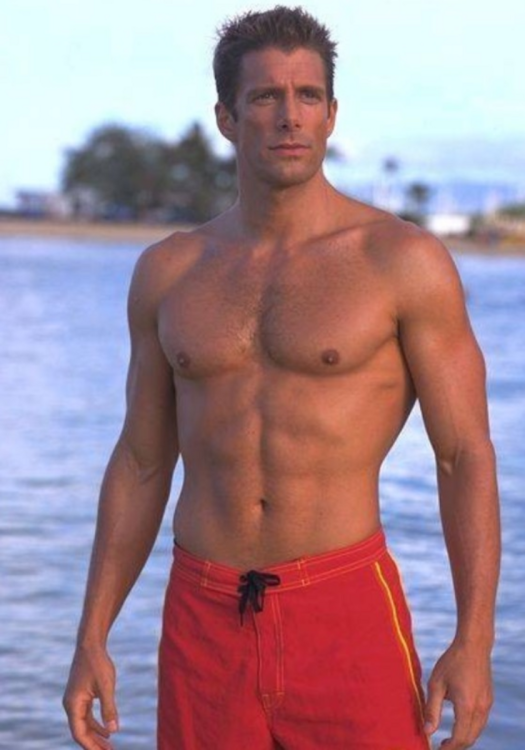 Check him out in episode one of season three before the opening credits. He is swoon-worthy with that smile. Jason sexy butt is shown rather quickly in season one too.😂😍I think it's episode 3 when he's walking away from the girls into the school building.
A gay triangle would be nice to see.
Well look who is being featured boring Will and his boring girlfriend Electra.
Which means that frat boy junior was shirtless. His lack of acting mirrors his father's. 😂😂😂😂
Sonny another legacy character with ties to Salem nowhere to be found. But hey, we've got Leo still stinking up the place.
This should be the show's motto. So many missed opportunities.
And the DiMeras are played out. It's time to write them out and focus on the Horton family. I'm not interested in what EJ and his goons are up to.
I'm sure Chandler would return given a meaningful or meaty storyline. Previous writers kept writing him in and out, which wasn't any form of job security, and that's why he got a real job. He needed a constant paycheck. Previous writers and the current writers were/are too busy writing for Leo, of all people, who has no ties to Salem.
And nowhere near the Gala. I see Lucas and Mark are still around. The rest is just blah.
Watched back-to-back episodes early this morning with Thursday and Friday's episodes. i enjoyed Thursday episode more than Friday's episode for obvious reasons. I just hate the taping schedule where half of the returns are on one episode and the others in another episode. The Gala celebration just felt so disjointed. Lani was supposedly getting drinks but never appeared at the Gala. Where was Kate and mumbles? Why weren't they at the Gala? Weren't Paul and Andrew supposed to appear in today's episode too? Overall the Gala celebration was a miss. Not sure I'll continue watching on Monday.. .
Rewatching the first two seasons of the show in 4K made me remember what a crush I had on Jason Priestley. He was so hot!
Check him out in episode one of season three before the opening credits. He is swoon-worthy with that smile. Jason sexy butt is shown rather quickly in season one too.😂😍I think it's episode 3 when he's walking away from the girls into the school building.
A gay triangle would be nice to see.
Well look who is being featured boring Will and his boring girlfriend Electra.
Which means that frat boy junior was shirtless. His lack of acting mirrors his father's. 😂😂😂😂
Sonny another legacy character with ties to Salem nowhere to be found. But hey, we've got Leo still stinking up the place.
This should be the show's motto. So many missed opportunities.
And the DiMeras are played out. It's time to write them out and focus on the Horton family. I'm not interested in what EJ and his goons are up to.
I'm sure Chandler would return given a meaningful or meaty storyline. Previous writers kept writing him in and out, which wasn't any form of job security, and that's why he got a real job. He needed a constant paycheck. Previous writers and the current writers were/are too busy writing for Leo, of all people, who has no ties to Salem.
And nowhere near the Gala. I see Lucas and Mark are still around. The rest is just blah.
Watched back-to-back episodes early this morning with Thursday and Friday's episodes. i enjoyed Thursday episode more than Friday's episode for obvious reasons. I just hate the taping schedule where half of the returns are on one episode and the others in another episode. The Gala celebration just felt so disjointed. Lani was supposedly getting drinks but never appeared at the Gala. Where was Kate and mumbles? Why weren't they at the Gala? Weren't Paul and Andrew supposed to appear in today's episode too? Overall the Gala celebration was a miss. Not sure I'll continue watching on Monday.. .
Rewatching the first two seasons of the show in 4K made me remember what a crush I had on Jason Priestley. He was so hot!
Important Information
By using this site, you agree to our Terms of Use and Privacy Policy

.jpeg.e3c39e73de1249d1747abb9216f74444.jpeg)

Account
Navigation
Search
Configure browser push notifications
Chrome (Android)
- Tap the lock icon next to the address bar.
- Tap Permissions → Notifications.
- Adjust your preference.
Chrome (Desktop)
- Click the padlock icon in the address bar.
- Select Site settings.
- Find Notifications and adjust your preference.
Safari (iOS 16.4+)
- Ensure the site is installed via Add to Home Screen.
- Open Settings App → Notifications.
- Find your app name and adjust your preference.
Safari (macOS)
- Go to Safari → Preferences.
- Click the Websites tab.
- Select Notifications in the sidebar.
- Find this website and adjust your preference.
Edge (Android)
- Tap the lock icon next to the address bar.
- Tap Permissions.
- Find Notifications and adjust your preference.
Edge (Desktop)
- Click the padlock icon in the address bar.
- Click Permissions for this site.
- Find Notifications and adjust your preference.
Firefox (Android)
- Go to Settings → Site permissions.
- Tap Notifications.
- Find this site in the list and adjust your preference.
Firefox (Desktop)
- Open Firefox Settings.
- Search for Notifications.
- Find this site in the list and adjust your preference.