Jump to content
View in the app

A better way to browse. Learn more.

Soap Opera Network Community

A full-screen app on your home screen with push notifications, badges and more.

To install this app on iOS and iPadOS
  1. Tap the Share icon in Safari
  2. Scroll the menu and tap Add to Home Screen.
  3. Tap Add in the top-right corner.
To install this app on Android
  1. Tap the 3-dot menu (⋮) in the top-right corner of the browser.
  2. Tap Add to Home screen or Install app.
  3. Confirm by tapping Install.

CBS Primetime Star Sees "THE LIGHT"

IPB Image

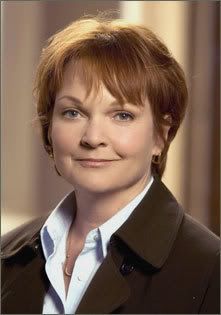
STILLWATER, OK - As previously mentioned earlier this week (See Story) a rumor began making the rounds that an actress from a hit new fall CBS primetime show would be joining "THE LIGHT" cast in a short-term role. Casting director of the SONBC blog and series head writer, Josh Hawkins is confirming that indeed the actress is on her way.

From the hit series, "JERICHO" cast and crew welcomes...
IPB Image

Pamela Reed to the series.

Reed who currently stars in the freshman series, "Jericho" has signed onto the SONBC blog for a limited run, about five weeks. "I have been a fan of Pamela's for years." Shares Hawkins, "And while watching her in "Jericho" I just knew that I wanted her for a role on the blog."

And what role is that? "Ms. Reed will be playing a character named Sandra who first interacts with Olivia [Crystal Chappell] beginning on Friday, December 16th. Reed will most likely exit "THE LIGHT" sometime near the end of January 2007, as "Jericho" returns in February.

"This story is an exicting one! It will incorporate Ed, Holly and Hope as well. Look for Mel and Michelle to play a key role as well." Smiled Hawkins, "I think I've said to much as it is."

1 Comment

Recommended Comments

Actor87

Member

  • Member

Flove her! She's so great. EXCELLENT casting choice!! :D

Also good to see that the Bauers will be getting plenty of airtime in the near future! ;)

Guest
Unfortunately, your content contains terms that we do not allow. Please edit your content to remove the highlighted words below.
Add a comment...

Important Information

By using this site, you agree to our Terms of Use and Privacy Policy

Configure browser push notifications

Chrome (Android)
  1. Tap the lock icon next to the address bar.
  2. Tap Permissions → Notifications.
  3. Adjust your preference.
Chrome (Desktop)
  1. Click the padlock icon in the address bar.
  2. Select Site settings.
  3. Find Notifications and adjust your preference.